CRM with invoicing: invoices and quotes your AI makes in one sentence
Zyflow does the math, not the model.
Zyflow is a CRM with invoicing for the AI app you already use. When the work is done, tell Claude or ChatGPT2 “Invoice Northwind for 3 workshop days at $1,200, plus 10% tax.” Zyflow numbers the invoice and works out the tax: $3,600 plus $360, or $3,960 in total. It renders a PDF with your logo and files it on Northwind’s record. Your AI hands you a link to the PDF that works for 7 days, ready to forward to your client.
Free plan. No card.
Zyflow is a lightweight small-business CRM your AI app keeps up to date (Claude, Cursor, ChatGPT Business, any MCP app). Every AI change is labeled. Zyflow works with any AI app that supports MCP, the standard way AI apps connect to tools.
What happens when you ask your AI for an invoice?
Your AI passes on what you said, and Zyflow does the rest in one step: it matches the customer, numbers the invoice, works out the tax, renders the PDF, files it and hands your AI a link.
Here’s “Invoice Northwind for 3 workshop days at $1,200, plus 10% tax,” step by step:
- 3 workshop days at $1,200
- $3,600
- 10% tax
- $360
- Total
- $3,960
-
Zyflow finds the customer you already have.
If two could match, it has your AI ask which one you mean. If none matches, Zyflow makes nothing and gives your AI the closest names.
-
Unless you asked for a draft, the invoice is issued and numbered right away: INV-0007.
A draft stays unnumbered until you issue it.
-
Zyflow works out tax per line, to the cent: $3,600 plus $360 is $3,960.
The invoice is due in 15 days unless you say otherwise.
-
Zyflow renders the PDF with your logo, colors and business details.
Its renderer runs with the network blocked, so no third-party PDF service sees your invoice.
-
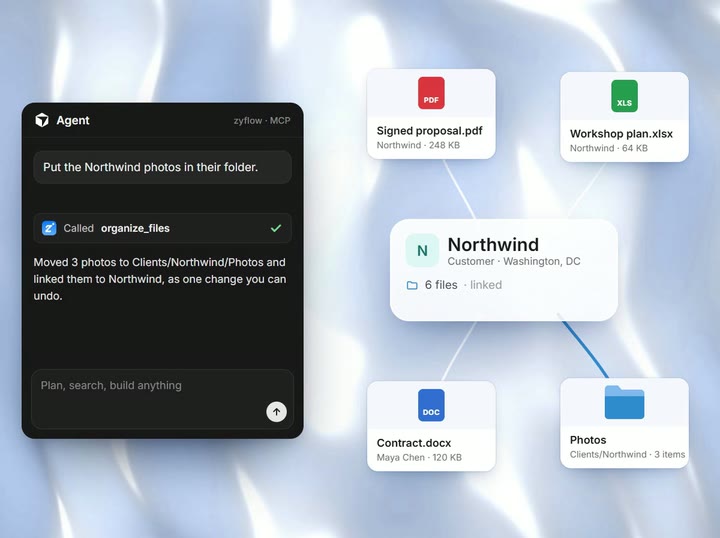
Zyflow files the PDF in your files drive under Invoices/2026, linked to Northwind, and to the deal if your AI names one.
-
Your AI gets a link that opens the PDF for 7 days without sign-in.
The change shows in History with the app that made it (“Claude via MCP”) and an Undo.1
Who does what
Your AI passes on the quantities, prices and tax rates you gave it, and Zyflow does the arithmetic. The web app’s editor, the PDF and every AI-made invoice use the same calculation, so the totals match wherever you look.
| Your AI | Zyflow |
|---|---|
| Names the customer the way you did | Matches it to the record you already have, or sends back candidates for your AI to ask you about |
| Passes on the quantities, prices and tax rates you gave | Rounds each line to the cent, adds in whole cents and groups tax by rate |
| Asks for a draft if you said so | Numbers the invoice on issue and leaves drafts unnumbered |
| Hands you the PDF link | Renders, files and labels it, with a link that works for 7 days |
| Undoes the change if you ask | Lets you edit or void an issued invoice, and gives the number back when you undo the last invoice issued |
Unit prices come from what you or your AI enter; there's no price list. Zyflow sends nothing to your customers. Your AI drafts; you press send.
Want to check it before it gets a number? Say “make it a draft.”
Free plan. No card.
Start freeWhat if your AI gets an invoice wrong?
Edit it, void it or undo it. Every change names the app that made it, and one click undoes it.1 If you undo the last invoice issued, its number comes back. An issued invoice can be edited or voided but not deleted. To check an invoice before it gets a number, ask for a draft: it’s numbered only when you issue it.
See how undo worksYour AI will get things wrong sometimes. Plan for that:
- Wrong rate? Say “Change the day rate on INV-0007 to $1,100.” Zyflow works out the totals again ($3,630) and renders a new PDF.
- Wrong customer? Undo it. If it was the last invoice issued, INV-0007 is free for the next one.
- Client canceled? Void it. The invoice keeps its number and gets a VOID watermark, so your numbering has no gaps.
Quotes and quotations
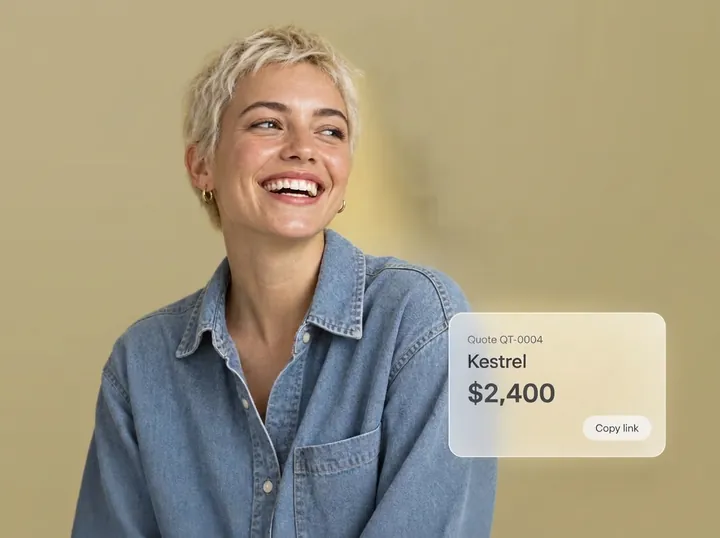
Quotes work like invoices: your AI asks, and Zyflow numbers the quote (QT-0003), works out the tax, renders the PDF and files it on the customer. Zyflow is a CRM with quotes and invoicing in the same customer record, so when the client says yes, nobody retypes anything.
From quote to invoice in one step
Say “Northwind accepted QT-0003, invoice it.” Zyflow copies the customer, lines, notes, currency and reference into a new invoice, marks the quote accepted and links the two. Each quote converts once.
- A quote is valid for 30 days unless you set another date, then shows as Expired.
- Statuses: Open, Accepted, Declined and Expired. Reopen a declined or void quote before converting it.
- Quotes print lines for the client to sign and return. There’s no e-signature.
- The heading follows your country: Quote in the US and Canada, Quotation elsewhere. Want “Estimate”? Ask your AI to change the heading on any document.
- The quote-to-invoice step copies the whole quote. There’s no deposit or partial invoicing.
Prompts to try
-
“Quote Kestrel for 2 workshop days at €950, 20% VAT, valid until end of month.”
-
“Northwind accepted QT-0003. Turn it into an invoice.”
The first comes to €1,900 plus €380 of VAT: €2,280.
See how quoting fits your work: CRM for freelancers · CRM for consultants
Recording payments (not collecting them)
Zyflow records payments; it doesn’t collect them, and there are no card payment links. When a client pays, you or your AI record the amount. A part-payment leaves the rest due on the invoice. Overdue invoices show on Today and in the 8am email until they’re paid, and your payment instructions, such as bank details, print on every unpaid invoice.
Looking for a CRM with invoicing and payments? Zyflow tracks what’s paid and what’s due. Your bank or payment app moves the money.
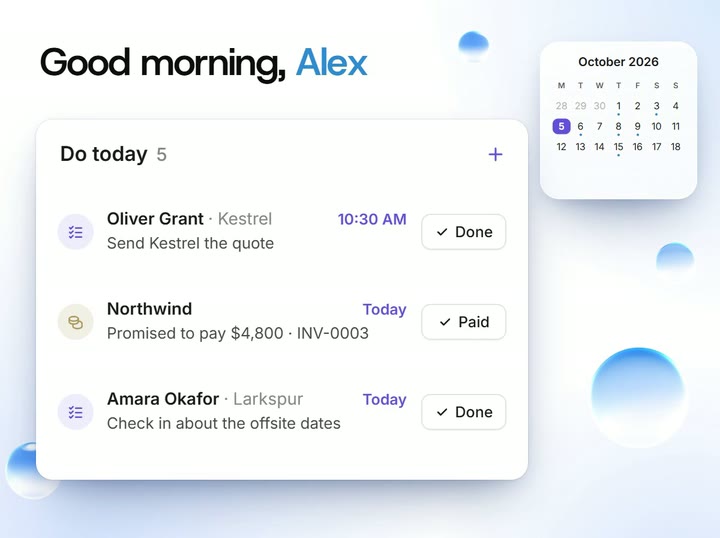
See the morning list- Say “Northwind paid $2,000 on INV-0007.” The invoice shows Partially paid, with $1,960 due, and turns Paid by itself when the rest is recorded.
- Zyflow refuses a payment larger than the balance due.
- Your invoice list ends with three totals: unpaid, overdue and paid in the last 30 days. They count only invoices in your workspace currency.
- Each invoice keeps the total paid, not a dated list of every payment.
- Need to nudge a client? Your AI can draft the reminder. You send it.
- Money owed outside an invoice works too: “Northwind owes $4,800, will pay by the 15th” records the balance, the promise date and a reminder that closes once the payment is recorded.
How it works, in 3 steps
-
Paste one link into your AI app.
Add your Zyflow link to Claude, ChatGPT,2 Cursor or any app that supports MCP.
-
Sign in and approve.
Sign in, or create your free account, and choose the one workspace the app may use. It works like “Sign in with Google”: you never paste a password into your AI app.
-
Talk.
Tell your AI what happened, or what to bill. Zyflow files it on the customer you already have, labeled, with an Undo.1
Any currency, with your country’s defaults
Bill a client abroad in their own currency. Each invoice or quote can use any ISO currency, formatted with that currency’s symbol and decimals. Zyflow doesn’t convert currencies, and the totals on Today count only your workspace currency. The tax label, tax ID label, paper size, quote heading and date style follow your business’s country.
Defaults by country
| Business in | Tax label | Your tax ID prints as | Paper | Quote heading | Date on PDF |
|---|---|---|---|---|---|
| US | Sales tax | EIN | Letter | Quote | Oct 9, 2026 |
| UK | VAT | VAT number | A4 | Quotation | 9 Oct 2026 |
| EU | VAT | VAT ID | A4 | Quotation | 9 Oct 2026 |
| Canada | GST | Business number | Letter | Quote | 9 Oct 2026 |
| Australia | GST | ABN | A4 | Quotation | 9 Oct 2026 |
You can change every default. About 37 countries have their own tax labels; everywhere else starts with Tax and Tax ID.
Limits
- One tax rate per line, and prices are before tax. That rules out GST plus PST on one Canadian line, and tax-inclusive prices.
- Amounts round to 2 decimals, even in currencies that use 3.
- Zyflow is in English only. Your own AI can draft messages in your customer’s language.
Invoice templates: built in, custom or designed by your AI
Every invoice and quote uses a built-in template or one of your own. The 5 built-ins are Clean, Bold and Classic for invoices and quotes, and Letter and Offer letter for other paperwork. All of them use your logo, colors and business details from day one, and one click copies a built-in for you to change.
Custom templates with fields
Write your own template in HTML with Liquid placeholders, on A4 or Letter, with up to 40 fields in 10 types. Zyflow saves it only once it passes its checks: syntax errors point to the line and column, a trial render runs with sample data, and a misspelled variable gets a “did you mean” suggestion.
Ask your AI for a template
Describe the design you want. Your AI reads a built-in template and the variable guide, saves a new template and shows you a preview PDF. If a check fails, your AI gets the error, fixes it and tries again. Moving from other invoice and quote software? Describe your old layout, and your AI can build a template close to it. How good the design looks depends on your AI app.
Limits: there's no drag-and-drop builder, and templates can't load external images or fonts.
Prompt to try
-
“Make an invoice template based on Classic, with our brand color as a band across the top and a field for the project code.”
Letters and offer letters on your letterhead
Letters and offer letters use the same letterhead as your invoices and are filed in Files. An offer letter has fields for the candidate, position, team, employment type, start date, location, compensation, manager, probation, benefits, a respond-by date and terms. The signatory defaults to you and your role.
The wording is generic. It isn't a contract written for your country, and it isn't legal advice.
Prompt to try
-
“Make an offer letter for Dana as studio designer, full-time, starting November 2, at $85,000 a year.”
Is invoicing included on the Free plan?
Yes. Invoices, quotes and letters, with their PDFs, are on every plan, including Free. They don’t count toward your record limit, but the PDFs count toward file storage (1 GB on Free). So Zyflow is a free CRM with invoicing for one person, with no card and no time limit. Your AI’s calls to Zyflow are never billed.
Not a fit if...
Zyflow isn’t the right tool for your invoicing if you need any of these:
- card or bank payment collection, “Pay now” links or reconciliation
- structured e-invoices (Peppol and similar) where your country requires them for business customers. Belgium, for example, has required them between VAT-registered businesses since January 1, 2026.
- several taxes on one line, compound taxes or tax-inclusive prices
- reverse-charge or withholding rules worked out for you
- recurring invoices, deposits, or partial invoicing from a quote
- credit notes, receipts or purchase orders as their own document types
- accounting, bookkeeping or a sync with accounting software
- e-signature, or “sent” and “viewed” tracking
- a price list or product catalog
Beyond invoicing, Zyflow isn’t a fit yet if you need email or calendar sync, SSO or two-factor sign-in, a home for regulated data such as patient records, or more than 30 people.
Spot an error? Tell us.
Questions about invoices and quotes
What should a CRM with invoicing do?
A CRM with invoicing should turn an accepted quote into an invoice without retyping and number invoices without gaps. It should work out tax per line, file a branded PDF on the customer’s record, track what’s paid and due, and bill in your client’s currency. Zyflow does all of these. It doesn’t collect payments; you or your AI record them.
Can Claude or ChatGPT make invoices in Zyflow?
Yes. Claude can on every plan, including Claude Free. ChatGPT can on Business, Enterprise or Edu plans in developer mode.2 Claude Code, Cursor, VS Code, Gemini CLI, Windsurf and any MCP app can too. The Claude CRM and ChatGPT CRM pages cover setup, and the CRM MCP server page lists the document tools.
Does Zyflow send the invoice to my client?
No. Zyflow sends nothing to your customers. Your AI hands you a PDF link that works for 7 days, and the PDF is filed in Files. Forward the link, or attach the PDF to your own email or message. Zyflow doesn’t track whether an invoice was sent or opened.
Does it work with QuickBooks, Xero or other accounting software?
No. Zyflow isn’t accounting software and doesn’t sync with QuickBooks, Xero or any other ledger. If you already invoice from your accounting app, an owner or admin can switch documents off in Settings, and your AI apps then can’t make them. Money owed and follow-ups still work.
Are Zyflow invoices valid for VAT or e-invoicing rules?
Zyflow prints your business details, your tax ID and the tax on each line, grouped by rate. It doesn’t check an invoice against your country’s rules, validate VAT numbers or make structured e-invoices such as Peppol. Whether an invoice meets your local rules is a question for your accountant.
Who can open the PDF link?
Anyone who has the link can open the PDF for 7 days, without signing in. That’s what lets you forward it to a client. After 7 days the link stops working: ask your AI to pull up the invoice again for a fresh link, or download the PDF from Files.
Do invoices count toward my plan’s limits?
Not toward records. Records are contacts, companies and deals, so invoices, quotes and letters don’t count. Their PDFs count toward file storage, which is 1 GB on Free. Each document can have up to 200 lines.
Can I export my invoices and quotes?
Yes. The JSON export includes your invoices, quotes and letters with their line items, plus your own templates, on every plan.3 The PDFs are listed among your files with links, and you download them separately from Files. There’s no invoices-only CSV. Scripts can also reach the documents in the REST API.
- 1 Undo works within your plan’s history window: 30 days on Free, up to 3 years on paid plans. Deleted items can be restored for 30 days on every plan. Settings changes, such as pipelines, custom fields and tag renames, are logged but can’t be undone.
- 2 Writing to Zyflow from ChatGPT needs developer mode on a ChatGPT Business, Enterprise or Edu plan. It’s in beta, on the web, and an admin switches it on. Claude works on every plan. Checked October 2026.
- 3 Export gives you six CSV files, or one JSON file with your records, documents, change history (up to 100,000 changes) and links to every file. File contents download separately from Files.
Source: Belgian FPS Finance, e-invoicing (einvoice.belgium.be), checked Oct 3, 2026. Last updated Oct 3, 2026
Your AI talks. Zyflow remembers.
Tell your AI what happened. Zyflow keeps the record.
If your AI gets something wrong, undo it.1 If Zyflow isn’t for you, export your records, documents and history.3
Free plan. No card. Connect your AI in about two minutes.