The short version: The right Pipedrive alternative depends on team size and how you sell. HubSpot Free covers 2 users, Zoho CRM Free covers 3, and Bigin has the lowest per-person price we checked. Close suits sales teams that call and text all day. Pipedrive stays the better fit for sales teams that run on email sync and automations. Zyflow fits small teams that work in Claude or ChatGPT2: Free covers one person, and Team covers up to 10 people for $25 a month billed yearly.
Why teams look for a Pipedrive alternative
Small teams often go looking for a Pipedrive alternative for two reasons: the bill grows with each new person, and there’s nothing to fall back on when the trial ends. Pipedrive charges per seat on all four of its plans and has a 14-day trial but no free plan (pipedrive.com/en/pricing, checked Oct 3, 2026).
Pipedrive isn’t expensive for one person. The cost is in the model: every seat is priced, so a team of five pays five times what one person pays. Teams also run into these limits:
- Full email sync and automations sit on Pipedrive’s higher plans, not on Lite.
- AI use through Pipedrive’s MCP server is “subject to token limits based on your plan,” and you can buy more tokens (pipedrive.com/en/features/mcp-server, checked Oct 3, 2026).
- Service businesses often keep quotes, invoices and files in separate tools and retype the same details into each.
Software that costs more every time you add a person quietly discourages you from growing.
Pipedrive vs Zyflow at a glance
Pipedrive and Zyflow both let Claude and ChatGPT update your records.2 They differ on three things: a free plan against a trial, a per-seat bill against one team price, and what the customer record holds. Pipedrive has the deeper sales toolkit: email sync, automations and a large app marketplace. Zyflow keeps quotes, invoices, files and money owed on the same customer, and never bills your AI’s calls.
| Row | Pipedrive | Zyflow (ours) |
|---|---|---|
| Free plan | None; 14-day trial, no card | Yes: 1 person, 5,000 records, no time limit |
| Pricing model | Per seat, 4 plans | One price for the whole team: Solo up to 3 people, Team up to 10, Pro up to 30 |
| Entry paid price | Lite: $14 a seat a month, billed annually | Solo: $10 a month billed yearly ($12 monthly), for up to 3 people |
| The CRM’s own AI | Pipedrive Nova: meeting intelligence and AI report creation on Lite | None. Zyflow runs no AI; your AI app does the work |
| Connects to Claude and ChatGPT | Yes: native MCP server on all plans since Jun 30, 2026 | Yes, on every Zyflow plan. Works on any Claude plan; ChatGPT writes need developer mode on Business, Enterprise or Edu |
| Your AI’s calls | “No extra cost”; “subject to token limits based on your plan”; extra tokens can be bought | Never billed; no credits or tokens to buy |
| How AI changes are recorded | Recorded in Pipedrive’s change logs, within the user’s permissions | Each change labeled with the app that made it (“Added by Claude via MCP”), and listed in History |
| Email sync and automations | On higher plans | None |
| Reports | AI report creation on Lite; more reports on higher plans | The morning list on Today and a weighted forecast per stage; no custom reports |
| Quotes, invoices and contracts | Contracts and e-signatures on higher plans | Invoices, quotes and letters as numbered PDFs on every plan; no e-signature or payment collection |
| Integrations | A large app marketplace | REST API and API keys; no native integrations |
Zyflow doesn’t read your inbox, calendar, calls or WhatsApp; tell your AI, or paste the thread. Zyflow records payments; it doesn’t collect them, and there are no card payment links.
We check every competitor fact against the vendor’s own page and date it. Where a competitor does something better, we say so. Spot an error? Tell us, and we’ll fix it.
Pipedrive pricing: how much does Pipedrive cost in 2026?
Pipedrive charges per seat and has no free plan. Lite costs $14 a seat a month billed annually ($168 a seat a year), so 5 people pay $70 a month (pipedrive.com/en/pricing, checked Oct 3, 2026). Pipedrive’s pricing page showed two different sets of prices for Growth, Premium and Ultimate when we checked, so we list Lite only until we’ve confirmed them.
What a team pays
On annual billing, 5 people pay $70 a month on Pipedrive Lite. Zyflow Team covers up to 10 people for $25 a month billed yearly. The table runs the same math for every CRM on this page at five team sizes, counting free plans where they cover the team.
| People | 1 | 3 | 4 | 5 | 10 |
|---|---|---|---|---|---|
| Zyflow (ours), billed yearly | $0 Free or $10 Solo | $10 Solo | $25 Team | $25 Team | $25 Team |
| Pipedrive Lite, $14 a seat | $14 | $42 | $56 | $70 | $140 |
| HubSpot Starter, from $7 a seat yearly for new customers ($20 monthly); Free covers 2 users | $0 | $21 | $28 | $35 | $70 |
| Zoho CRM Standard, $14 a user; Free covers 3 users | $0 | $0 | $56 | $70 | $140 |
| Bigin Express, $7 a user; Free covers 1 user and 500 records | $0 | $21 | $28 | $35 | $70 |
| Close Essentials, $35 a user; Solo, $9, covers 1 user | $9 | $105 | $140 | $175 | $350 |
| Less Annoying CRM, $15 a user | $15 | $45 | $60 | $75 | $150 |
Where another CRM costs less
- For 1 person, Zyflow Free, HubSpot Free, Zoho CRM Free and Bigin Free all cost $0.
- At 2 or 3 people, Zoho CRM Free (3 users) costs $0, and so does HubSpot Free at 2. Solo costs less than every paid plan in the table.
- From 4 to 10 people, Team costs less than every paid plan in the table. At 4 people the gap is small: Bigin and HubSpot’s new-customer Starter price are $28 against Team’s $25.
- On monthly billing, Team is $30 a month.
- Some flat-priced CRMs we haven’t verified may cost less.
- Pipedrive includes sales tools Zyflow doesn’t have, such as email sync and automations.
For more team sizes, see what a team pays elsewhere.
We check every competitor fact against the vendor’s own page and date it. Where a competitor does something better, we say so. Spot an error? Tell us, and we’ll fix it.
Free plan. No card.
When Pipedrive is the better choice
Pipedrive is the better choice for sales teams that work from the inbox and run a repeatable sales process. Stay on Pipedrive if:
- your team runs on email sync with tracking, or on automations
- you need contracts with e-signatures, or apps from its marketplace
- you need a native mobile app
- you rely on pipeline reports and forecasts beyond a weighted total per stage
- you want AI built into the CRM, such as Nova, rather than working through your own AI app
- you have more than 30 people
Zyflow has no email sync, automations or e-signature. If calling and texting matter as much as email, look at Close too.
Other Pipedrive alternatives worth a look
These are the Pipedrive alternatives we’d shortlist for a small team: Zyflow, HubSpot Free, Bigin, Zoho CRM, Close and Less Annoying CRM. Which one fits depends on how many people need a login, whether you sell by phone and email, and whether you work through an AI app. Zyflow is ours, so it’s listed first.
| CRM | Free plan | Entry paid plan, billed annually | Who it suits |
|---|---|---|---|
| Zyflow (ours) | 1 person, 5,000 records | Solo: $10 a month for up to 3 people, not per seat | Small teams that work in Claude or ChatGPT |
| HubSpot | 2 users, 1,000 contacts | Starter: from $7 a seat for new customers ($20 monthly) | Two people who want a free CRM with marketing tools and email |
| Bigin by Zoho | 1 user, 500 records | Express: $7 a user | The lowest per-person price we checked, for a simple pipeline |
| Zoho CRM | 3 users, 5,000 records | Standard: $14 a user | Three people free, inside a wider suite |
| Close | None; 14-day trial | Solo: $9 for 1 user; Essentials: $35 a user | Inside-sales teams that call, email and text all day |
| Less Annoying CRM | None; 30-day trial | $15 a user, one plan | One simple plan and phone support, no AI |
| Pipedrive (for reference) | None; 14-day trial | Lite: $14 a seat | Sales teams that want a visual pipeline, email sync and automations |
Which Pipedrive alternatives are free?
HubSpot Free covers 2 users and 1,000 contacts, Zoho CRM Free 3 users and 5,000 records, and Bigin Free 1 user and 500 records. Zyflow Free covers 1 person and 5,000 records, with invoices, quotes, files and AI connections included. Pipedrive, Close and Less Annoying CRM offer trials but no free plan (checked Oct 2–3, 2026).
The test we used: does it work with the AI you already pay for?
To answer that, we checked three things: whether Claude and ChatGPT can connect, how the CRM bills its own AI, and whether your AI’s calls to it are limited or billed. Every CRM in the table except Less Annoying CRM has an official MCP server, so most of the difference is in billing.
| CRM | Connects to Claude and ChatGPT | How the CRM’s own AI is billed | Your AI’s calls to the CRM |
|---|---|---|---|
| Zyflow (ours) | Every plan, including Free; ChatGPT writes need developer mode on Business, Enterprise or Edu | No AI of its own, so nothing to bill | Never billed; no credits or tokens to buy |
| Pipedrive | Native MCP server on all plans, since Jun 30, 2026 | Nova included on Lite | “No extra cost,” but “subject to token limits based on your plan”; extra tokens can be bought |
| HubSpot | MCP on all accounts, including Free, since Apr 13, 2026; a ChatGPT plugin that reads and writes | Breeze AI, paid for in HubSpot Credits: 500, 3,000 or 5,000 a month by plan, then $0.01 each | Not listed (Oct 2, 2026) |
| Bigin by Zoho | Zoho MCP for Bigin, set up in the Zoho console | AI credits from the Premier plan up | Zoho MCP has a $0 license and uses your plan’s API limits |
| Zoho CRM | Zoho MCP, $0 license, set up by an admin; works with Claude and ChatGPT developer mode | Zia; no credit pricing shown on its pricing page | Counts against your plan’s API limits |
| Close | Official MCP server (121 tools) and an official ChatGPT plugin | Chloe AI agent, paid for in AI credits: 500 to 2,000 per user | Not listed (Oct 2, 2026) |
| Less Annoying CRM | No official MCP server; third-party tools only | No AI listed | Not applicable |
HubSpot Free: best for two people who want marketing tools and email
HubSpot Free covers 2 users and 1,000 contacts at $0, and lists invoices and payment links on Free. Its MCP server works on every account, and its ChatGPT plugin reads and writes. Past 2 users it’s per seat: Starter is from $7 a seat a month billed yearly for new customers, or $20 billed monthly, and its Breeze AI is paid for in HubSpot Credits.
Bigin by Zoho: best for the lowest per-person price we checked
Bigin is Zoho’s CRM for small businesses. Free covers 1 user and 500 records, and Express costs $7 a user a month billed annually ($9 monthly). Zoho MCP for Bigin connects Claude, set up through the Zoho console. Bigin’s own AI uses credits, from the Premier plan up.
Zoho CRM: best for three people free, inside a wider suite
Zoho CRM Free covers 3 users and 5,000 records, the most free seats in this list. Standard costs $14 a user a month billed annually ($20 monthly). Zoho MCP has a $0 license, uses your existing API limits and works with Claude and ChatGPT developer mode, but an admin sets it up. We haven’t confirmed it on the Free plan.
Close: best for inside-sales teams that call, email and text all day
Close is built for calling, emailing and texting, and has the largest MCP server we checked: 121 tools, with destructive writes kept in their own scope. There’s no free plan, only a 14-day trial. Solo is $9 for 1 user, and Essentials is $35 a user a month billed annually. Its Chloe AI agent runs on AI credits.
Less Annoying CRM: best for one simple plan and phone support, no AI
Less Annoying CRM has one plan: $15 per user per month plus tax, with a 30-day trial and free phone support. It lists no AI features and has no official MCP server, so Claude and ChatGPT reach it only through third-party tools. If you don’t want AI anywhere near your CRM, it’s a good fit.
Zyflow vs Pipedrive in detail
Zyflow is lighter than Pipedrive on selling and covers more of the customer record. It has a deals board, but no email sync, automations or custom reports. Money owed, quotes, invoices and files sit on the same customer, kept up to date by the AI app you already use, at one price for the team.
The pipeline
Every Zyflow workspace starts with a “Sales” pipeline of 6 stages, from New to Won and Lost, each with a win probability. The deals board shows each stage’s count and weighted forecast, and flags a card with “N days here” once a deal has sat in one stage for 14 days. Those stuck deals also show on Today. A pipeline can have up to 20 stages. Free includes 2 pipelines, Solo 5, Team 10 and Pro 50.
Tell Claude “The Northwind deal is won.” Zyflow moves it to Won, stamps today’s date and labels the change “Claude”, with an Undo.1
What Zyflow doesn't have: custom reports, dashboards or automations. Dragging cards doesn’t work on touch screens; on a phone, change the stage from the deal page.
When your AI writes
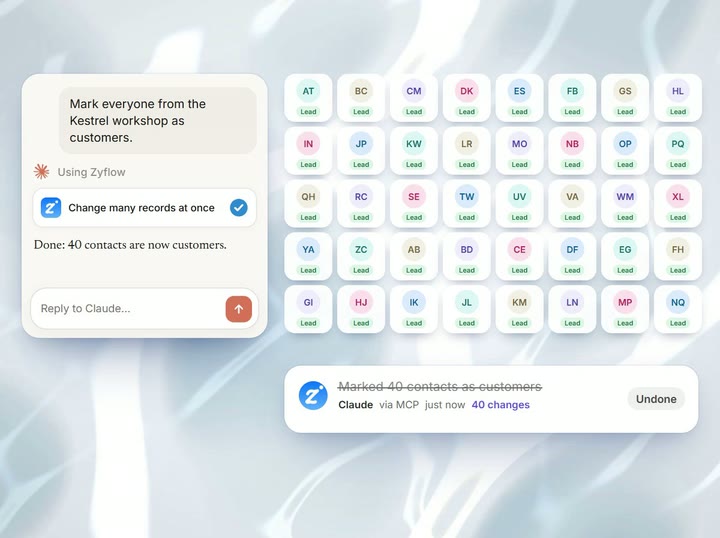
Your AI will get things wrong sometimes. Plan for that. Every change in Zyflow carries the name of the app that made it: “Added by Claude via MCP”. Each thing your AI does is one change, and one click undoes it, even 40 contacts edited at once.1 AI apps can only move records to a 30-day trash, and bulk changes preview first and stop at 200 records.
You sign in and approve, like “Sign in with Google”. Your AI app never gets your password, and it can’t touch billing, members or keys. Every member, and every member’s AI, can see and edit every customer; there are no per-person permissions yet.
Customers, quotes, invoices and files in one record
For a service business, the deal is only part of the customer. Say “Northwind owes $4,800, will pay by the 15th.” Zyflow records the balance and the promise date, and sets one collection reminder that closes itself once Northwind is paid up.
Say “Invoice Northwind for 3 workshop days at $1,200, plus 10% tax.” Zyflow numbers the invoice, works out the tax, files a PDF under Northwind and returns a link that works for 7 days. Invoices and quotes work in any currency, and a quote becomes an invoice in one step. Your AI can also browse, file and tidy the customer’s files in the files drive.
Zyflow records payments; it doesn’t collect them. Unit prices come from what you or your AI enter; there’s no price list. Through Zyflow, your AI can see images up to 5 MB and text files up to 1 MB, but not the text inside PDFs, Word or Excel files.
See how invoices and quotes work
One price as the team grows
Pay for your AI once. Bring the AI you already use. Zyflow runs none of its own, so there’s nothing to meter: one price for the whole team, any MCP app, and your data leaves with you.4
Zyflow is a CRM without per-user pricing. For 5 people, Pipedrive Lite is $70 a month billed annually; Zyflow Team covers up to 10 people for $25 a month billed yearly. AI apps and API keys never count as people.
Why it costs less: Zyflow runs no AI, so it has no AI costs to pass on and nothing to meter.
No hidden costs: no onboarding fee, no seat minimum, no AI credits and no overage charges. Free has no time limit.
If you’re weighing per-seat plans against flat ones, here’s what “unlimited users” means in CRM pricing.
Setup
Paste your Zyflow link into Claude, sign in and approve one workspace, and you’re connected in about two minutes. On ChatGPT Business, an admin switches on developer mode first.2 The CRM MCP server page lists the tools and the safety model, and Claude CRM covers what to say once you’re connected.
How to switch from Pipedrive
You can switch from Pipedrive with two CSV files and your AI. The CSV files bring over your contacts and companies. Open deals don’t come across that way, so your AI re-creates them, or you use the REST API.
-
Export your people and organizations from Pipedrive as CSV files.
-
In Zyflow, open Import and bring in contacts first, then companies. Check the guessed column mapping: a column named “Organization” maps to Company. Other Pipedrive columns may need mapping by hand.
-
Zyflow finds the records you already have. Rows that match update the record, rows that could match several records are skipped and listed, and the whole file is one change you can undo.1
-
A “Notes” column becomes a note on each record. Past activities don’t transfer.
-
Connect your AI: paste your Zyflow link into Claude or another MCP app, then sign in and approve your workspace.
-
Paste your list of open deals into your AI. It saves each one, labeled and undoable,1 or you can create them through the REST API.
Each file can hold up to 50,000 rows, within your plan’s record limit.
Not a fit if...
Zyflow isn’t a fit yet if you need:
- email or calendar sync, sequences, campaigns, dialers or forecasting
- dispatch, booking or texting for trades and field service
- a home for regulated data, such as patient records
- property listings and showings for real-estate work
- a WhatsApp inbox
- card payment collection or e-signature
- SSO, two-factor sign-in or per-person permissions
- certifications such as SOC 2, or EU data residency
- a native mobile app, or a language other than English
- more than 30 people
It’s also not for you if you don’t use an AI app and don’t plan to.
Pipedrive alternatives: FAQ
What is Pipedrive and why do teams use it?
Pipedrive is a sales CRM built around a visual deal pipeline, used by more than 100,000 companies. Teams choose it because deals are easy to see and move, and because Lite includes Pipedrive Nova for meeting intelligence and AI reports. It charges per seat and has no free plan (pipedrive.com, checked Oct 3, 2026).
Does Pipedrive have a free plan?
No. Pipedrive offers a 14-day trial with no card, then paid plans starting with Lite at $14 a seat a month billed annually. If you want a free plan instead, HubSpot Free covers 2 users, Zoho CRM Free covers 3, and Bigin Free and Zyflow Free each cover 1 person (checked Oct 2–3, 2026).
Does Pipedrive work with Claude and ChatGPT?
Yes. Pipedrive launched a native MCP server on June 30, 2026, available on all plans at “no extra cost.” AI apps that support custom MCP connections, including Claude and ChatGPT, can read and update records. Usage is “subject to token limits based on your plan,” and extra tokens can be bought (pipedrive.com, checked Oct 3, 2026).
What’s the best Pipedrive alternative for a 2-person team?
HubSpot Free covers 2 users at $0, and Zoho CRM Free covers up to 3 (checked Oct 2, 2026). Zyflow Free covers one person, and Solo covers up to 3 people for $10 a month billed yearly. For marketing email, pick HubSpot. For invoices and files on the same record your AI updates, try Zyflow.
Is Zyflow cheaper than Pipedrive?
On yearly billing, yes, at every team size in our table: 5 people pay $70 a month on Pipedrive Lite and $25 on Zyflow Team (checked Oct 3, 2026). Pipedrive does include sales tools Zyflow doesn’t have, such as email sync and automations, so weigh the tools your team would use alongside the price.
Can I move my data from Pipedrive?
Yes, as CSV files. Export people and organizations from Pipedrive, then import them as contacts and companies, up to 50,000 rows a file, as one change you can undo.1 Open deals don’t import by CSV: paste them into your AI, which re-creates each one, or use the REST API. Past activities don’t transfer.
Does Zyflow have email sync or automations like Pipedrive?
No. Zyflow doesn’t read your inbox, calendar, calls or WhatsApp, and runs no automations or sequences. Tell your AI what happened, or paste the thread, and your AI files it after showing you what it found. If your team depends on email sync, Pipedrive or Close fits better.
Does Zyflow charge for AI use?
No. Zyflow runs no AI of its own, so there are no AI credits or tokens to buy, and your AI app’s calls to Zyflow are never billed on any plan. Short burst limits stop runaway scripts. Your AI app’s own subscription and usage limits still apply.
Which Pipedrive alternatives work with ChatGPT?
Pipedrive’s own MCP server works with ChatGPT. Among the alternatives, HubSpot’s ChatGPT plugin reads and writes, Close has an official ChatGPT plugin, and Zoho CRM and Bigin connect through Zoho MCP, which an admin sets up. Less Annoying CRM has no official MCP server. Zyflow works with ChatGPT in developer mode on Business, Enterprise or Edu plans.2
Pipedrive or HubSpot?
Pipedrive suits sales teams that want a focused visual pipeline, and it charges per seat from the first person. HubSpot suits 2 people who want a free CRM with marketing tools, and charges per seat after that. Our HubSpot alternatives page compares it with other options.